 Takelight
What auto-zoom does
A click opens a zoom, 1.8 times by default. The Zoom level slider sets anything from 1.2 to 2.5 times. The view eases in over 0.4 seconds and follows the cursor while you keep clicking, pressing shortcuts or scrolling. After 1.5 seconds with no activity it eases back out over half a second. The view never leaves the frame.
This page is for anyone comparing screen recorders for Edge, including those searching for a Screen Studio alternative that runs as a browser extension for Microsoft Edge. Takelight covers this one effect for browser tabs. It is not a full video editor.
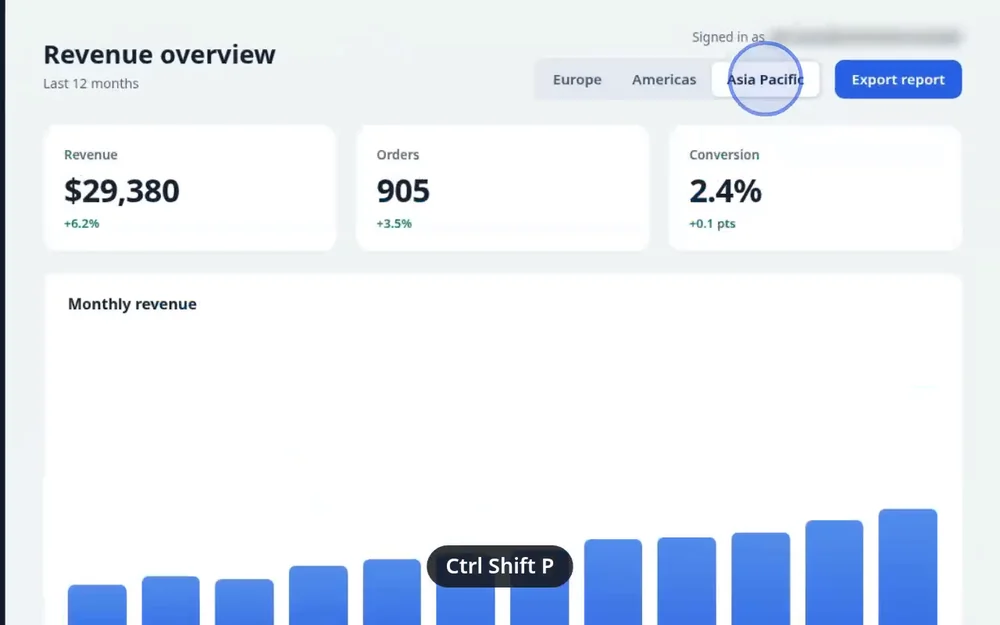
What else is drawn into the video
- A ring at every click. Free.
- The shortcut keys you press, such as Ctrl Shift P, on screen for about a second. Free. Letters typed into fields are never shown or saved.
- Chapters, added with Alt+Shift+M. Free.
- Blur for emails, phone numbers, IBANs, card numbers, API keys and password fields. Free, and off until you tick it.
- A cursor spotlight that dims the screen around the cursor. Pro.
How to record with auto-zoom
- Install Takelight from the Edge Add-ons store. The 7 days of Pro include auto-zoom.
- Open the tab, click the Takelight icon and choose Record this tab.
- On the recorder page, check that Auto-zoom is ticked and set the Zoom level.
- Press Start recording, switch to your tab during the countdown, and click through your demo. Pause on whatever should be close. Hold the mouse still for two seconds to zoom back out.
- Press Stop and save. Use Edit to trim the ends or cut a mistake.
What it does not do
- Auto-zoom is Pro. On the free plan you get the click ring, the shortcut keys, chapters and blur.
- It works on tab recordings only. Screen and window recordings have no effects, so it cannot zoom in on a desktop app.
- The zoom is drawn while you record and is part of the MP4. The editor trims and cuts, but it cannot move or remove a zoom afterwards. To change one, record the take again.
- A zoom starts only on a click. It will not go to a spot you never clicked.
Price
Pro is €39 for 6 months, €69 for a year or €139 for Pro forever. Video recording is part of Pro, with no watermark and no limit on the number or length of recordings. The free plan makes step guides from your clicks and keeps ten. Every row is in the pricing table.
Clicking through a task in a tab also gives you a written guide. See how to create an SOP by clicking through the task. Choosing a recorder by its limits? Read the Loom alternative page.
Try auto-zoom for 7 days
Install is free and needs no account. Record one demo with auto-zoom on and watch it back.
Takelight is an independent product.